
Songsterr Guitar Tabs & Chords
SongsterrMusic & Audio
4.26.74K Reviews
- Version
- 6.5.43
- Installs
- 5.00M
- Age Rating
- Teen
Screenshots
Our Review of Songsterr Guitar Tabs & Chords
 Analysis by Appyee
When I want to learn a song without turning practice into a research project, I look for a tab app that gets me from a title to something playable quickly. Songsterr Guitar Tabs & Chords is built around that simple need: it puts guitar, bass and drum parts together with playback, so I can follow a part and hear how it fits. It is free to download, but the way its paid option affects the experience is worth considering before you make it your regular practice tool.
What the free access gets you
The app is free, and that makes it easy to try as a practical companion for learning songs. There are in-app purchases listed at $9.99 per item, but I wouldn’t treat that figure as proof that every feature or piece of content costs the same amount. I’d check the purchase details in the app before paying, then judge the value by whether the specific paid access suits the way I practise.
That distinction matters: the free starting point can be useful on its own, while a paid purchase should earn its place by making a real difference to your routine. If you mainly look up a song now and then, spending may not be necessary. If you return to tabs often and want the app to be part of a steady practice habit, it makes more sense to explore what a particular purchase unlocks before deciding.
Using Songsterr as a practice companion
Songsterr is a music and audio app from Songsterr, and its focus is more specific than a general music player: it helps me work through instrument parts rather than simply listen to songs. It has a 4.2 average from around 58,000 ratings, and more than 5 million installs. Those figures suggest it has reached plenty of musicians, though they don’t tell me whether a particular arrangement will match my level or taste.
Finding a song and choosing a part
When you first open up Songsterr Guitar Tabs & Chords, you're greeted with a clean and intuitive interface. It's super user-friendly, which is a big plus if you want to dive straight into jamming without a steep learning curve. Whether you're a beginner or a seasoned guitarist, the app promises to meet you where you are in your musical journey.
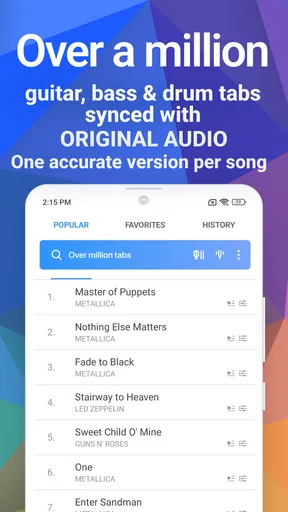
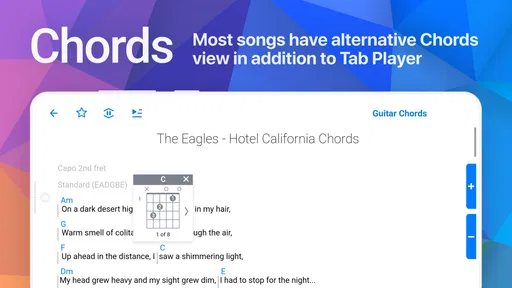
One of the standout features is the extensive library of tabs and chords. With over a million guitar, bass, and drum tabs and chords available, you’ll find a broad range of material to explore. It's a goldmine for anyone looking to expand their repertoire. The search function is pretty slick too, allowing you to find songs by artist, title, or even difficulty level.
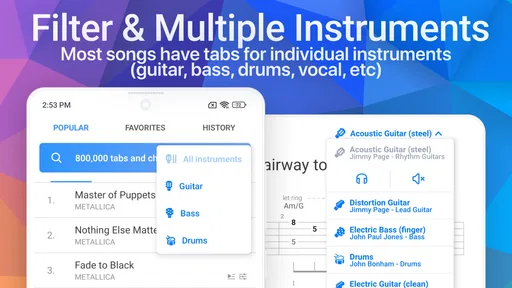
What's really cool is that each song comes with a complete set of tabs for all instruments involved. This means you can not only learn the guitar parts but also get insights into bass, drums, and more. It's like having the whole band in your hand!
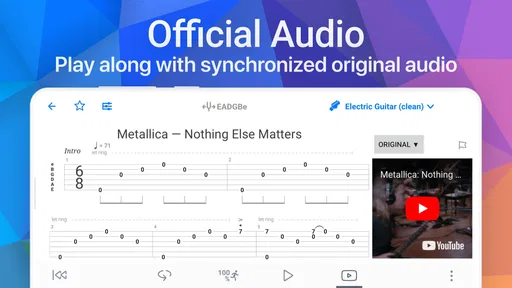
That multi-instrument view is especially useful when a guitar part feels confusing in isolation. I can listen to the arrangement and notice where a riff sits against the rhythm section, rather than guessing from the tab alone. It also gives a bassist or drummer a reason to open the same song instead of needing a separate resource. The practical trade-off is that an arrangement can still take interpretation: a tab is a guide to playing, not a substitute for listening closely or deciding how a part should feel.
Playback that supports deliberate practice
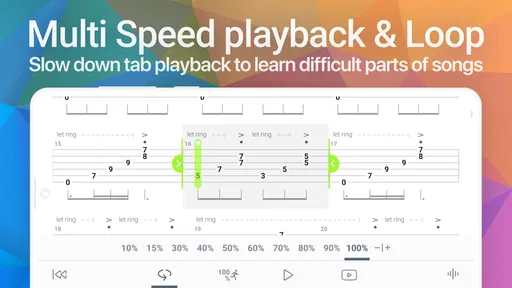
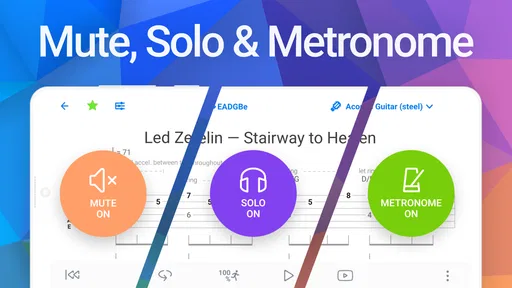
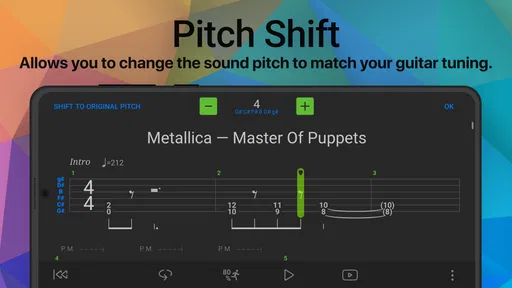
Now, let’s talk about what makes Songsterr really shine – its interactive features. The app offers a realistic playback feature that lets you hear how a song should sound. You can adjust the tempo, which is perfect for practicing those tricky bits at a slower pace before ramping up to full speed. Trust me, this feature alone is a game-changer.
The looping functionality is another favorite of mine. Got a challenging riff? Just loop it and practice until you nail it. It's like having an infinite patience teacher who won't mind if you hit replay a hundred times!
A useful way to combine those tools is to isolate a short phrase mentally, slow the playback, and repeat it until the fingering feels consistent. Then I bring the tempo up in stages rather than jumping straight to the original pace. This helps expose whether I’m missing a note or simply struggling with the change between notes. I also try to listen once before playing: copying the rhythm and articulation by ear keeps me from treating the tab as a row of unrelated numbers.
There is a limit to what playback can teach. Hearing a part is helpful, but it won’t tell me whether my hand position is relaxed or whether I’m using an efficient picking motion. For those problems, a teacher, a lesson video, or a mirror can be more useful. I see Songsterr as a song-learning aid, not a complete course that diagnoses technique.
Offline practice and everyday routines
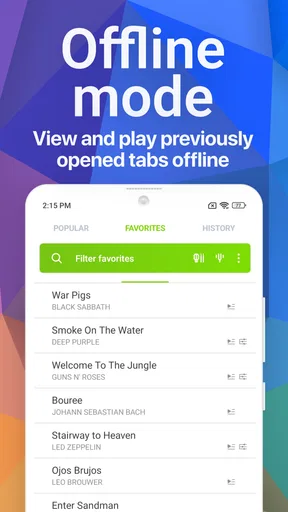
One of the things I appreciate most is the ability to access tabs offline. Whether you're traveling or just want to save some data, you can download your favorite tabs and practice anywhere, anytime. It's a small feature with a big impact, especially for those of us always on the go.
In an ordinary week, I’d use that for a short practice break away from home: pick a song before leaving, save the tab while connected, and then use the quiet moment to review a transition or rhythm. It’s also handy if your practice space has unreliable internet. The key is to prepare the material ahead of time rather than assume every song will already be available offline. That small habit turns offline access into something dependable instead of a last-minute hope.
How it compares with other ways to learn songs
Compared with searching for a one-off tab in a browser, an app that pairs notation with playback can make practice feel more focused: I can stay with the song and hear the part instead of hopping between pages and audio. Compared with video lessons, though, tabs are less helpful when I need to see posture, finger placement, or a teacher’s explanation of a technique. And compared with learning entirely by ear, the written part offers a quicker route to the notes, but can tempt me to follow the screen without developing my listening.
That makes the best choice depend on the question I’m trying to answer. If I want to work out a song’s notes and practise a section repeatedly, Songsterr is a natural fit. If I’m trying to understand a strumming feel, improve hand mechanics, or learn the theory behind a progression, I’d pair it with a lesson or another resource rather than expecting tabs to cover everything.
Community, reliability, and limits
Songsterr isn’t just about learning; it’s also about community. Users can contribute to the tab library, ensuring it's always growing and evolving. This collaborative spirit means you're getting a diverse range of tabs and insights from guitarists around the world.
If you've ever felt stuck or uninspired, the community aspect can give you that much-needed push. Seeing how others interpret and play songs can open up new avenues for creativity and expression.
Because the library includes user contributions, I’d still listen carefully and use judgement rather than assume every tab is the definitive version. If something sounds off, compare the playback with the recording and check whether you may be looking at a different arrangement or part. That is a useful habit with any shared tab collection, and it prevents a questionable transcription from becoming the foundation of a practice session.
The app is rated Teen, and its current version is 6.4.23, with Android 7.0 or later required. It is a focused option for musicians who want to consult tabs and practise along, but someone who only wants to stream music, read sheet music, or follow structured lessons may be better served by a different kind of app. Beginners can use it to get started, though they may need extra help understanding tab notation and basic technique.
Who is likely to get the most from it?
I’d recommend trying it if you play guitar, bass, or drums and often want to learn recognizable songs one part at a time. It is particularly useful for players who already understand their instrument well enough to turn a tab into comfortable movements, and for groups where different players want to study the same arrangement. The ability to hear and repeat a passage gives practice a clear task instead of leaving me to guess what to work on next.
I’d be more cautious if you expect a guided beginner curriculum, visual demonstrations of every movement, or a substitute for a teacher’s feedback. It may also be overkill if you only need an occasional chord shape; a simple chord reference can be quicker for that narrow job. The app’s strength is working through songs, not replacing every other way of learning music.
My verdict on the value
All in all, Songsterr Guitar Tabs & Chords is a must-have for any guitarist. It's packed with features that cater to both beginners and pros alike. The combination of a vast library, interactive tools, and offline accessibility makes it a fantastic resource for anyone looking to enhance their playing skills.
So, if you’re ready to take your guitar playing to the next level, download Songsterr and start exploring. Who knows? You might just discover your new favorite song to play. Happy strumming!
My recommendation is to begin with the free access and test it against a real practice goal: find a song you genuinely want to play, choose your instrument part, and see whether playback and repetition help you make progress. If they do, check the exact terms of any in-app purchase before spending; if you mainly need lessons, technique coaching, or occasional chord lookups, another tool may fit better. For focused song practice, though, Songsterr offers a useful mix of written parts and listening that can make a spare ten minutes feel like meaningful work.
Verdict
Strengths of Songsterr Guitar Tabs & Chords
- Extensive library of accurate tabs.
- Offline access to saved songs.
- Playback feature aids practice.
- Simple, intuitive interface.
- Supports multiple instruments.
Limitations of Songsterr Guitar Tabs & Chords
- Limited free version features.
- No option for custom tabs.
- Requires internet for full library.
- Subscription can be pricey.
- No lyrics included with tabs.
Similar Picks in This Category
View All
YouTube Music
Google LLC4.4

Samsung Music
Samsung Electronics Co., Ltd.3.8

Spotify: Music and Podcasts
Spotify AB4.3

JioSaavn - Music & Podcasts
Saavn Media Limited4.3

Lark Player:Music Player & MP3
Lark Player Studio - Music, MP3 & Video Player4.6

StarMaker: Sing Karaoke Songs
SKYWORK AI PTE. LTD.4.3
Frequently Asked Questions
What is Songsterr Guitar Tabs & Chords?
Songsterr Guitar Tabs & Chords is a comprehensive app designed for musicians of all levels, offering access to over 500,000 guitar, bass, and drum tabs. The app provides interactive playback, allowing users to learn songs by viewing the tabs and listening to the actual music simultaneously. It's a valuable tool for both beginners and experienced players.
Is Songsterr available for both Android and iOS?
Yes, Songsterr Guitar Tabs & Chords is available for download on both Android and iOS platforms. Users can find the app on the Google Play Store for Android devices and the Apple App Store for iOS devices. This cross-platform availability ensures that more users can benefit from its features.
Does Songsterr offer offline access to tabs?
Songsterr requires an internet connection to access its full library of tabs. However, users can download tabs for offline access with a premium subscription. This feature is particularly useful for musicians who wish to practice without worrying about internet connectivity.
What are the main features of Songsterr?
Songsterr offers numerous features including interactive tab playback, a large library of tabs, and the ability to slow down playback for easier learning. The app also allows users to loop specific sections of a song and provides a realistic guitar sound for better practice sessions. Premium users enjoy additional perks like offline access and ad-free usage.
Is there a free version of Songsterr, and what are its limitations?
Songsterr offers a free version with access to its extensive library of tabs. However, the free version includes ads and lacks offline access. For an ad-free experience and additional features like offline downloads and loop functionality, users can opt for the paid subscription. The premium version enhances the learning experience significantly.
